GPrackmodules
Chained Mixer — Modular Stereo Mixer
Chained Mixer is a group of modules in the GPaudio plugin for VCV Rack 2
Introduction
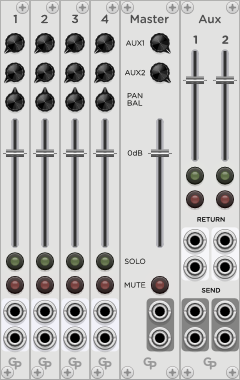
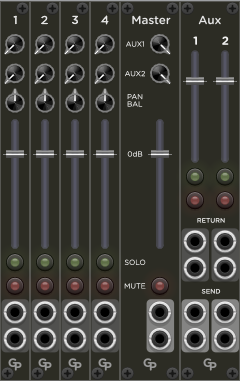
The Chained Mixer allows you to build customized stereo mixers with only the channels you need to minimize rack real estate usage. It offers a Main output and two Aux send and return channels.
Modules
The following modules are available for the mixer:
- Channel: an input channel
- Extended Channel: an input channel with additional controls, direct out and CV control
- Main: the Main Output section
- Aux: an optional Aux Send/Return section
Up to 16 Channel and/or Extended Channel modules can be combined with one Main and one Aux section by putting them into adjacent slots in your rack.
Mono and Stereo
All inputs and outputs are stereo but can also be used with mono signals by only connecting one input or output port. The mixer recognizes if one or two ports are connected and treats signals accordingly.
Therefore, you should NOT wire a mono signal source to both inputs in parallel. This is not only unnecessary, but it also messes up the Panorama/Balance algorithms in the mixer. Also, only connect one output if you only need a mono signal from the mixer.
Polyphony
The Chained Mixer accepts polyphonic input signals, but internal processing and all outputs are monophonic. This is best suited for a mixer stage at the output of a patch. For mixing inside a polyphonc synth voice, for example, between multiple oscillators and a filter or VCA, you have to use a fully polyphonic mixer such as the Daisy Mix modules from QuantalAudio or the Venom mixers, among others.
Channel Module
Use this module to provide input signals to the mixer.
Up to 16 Channel and or Extended Channel modules can be freely combined. Any additional modules, counting from left to right, will be non-functional. Any disabled channels will not show a channel number, and all controls will be dead.
Inputs
This module has two ports for a mono or stereo input signal.
If only one input port is connected, the mixer automatically treats the input as a mono input with the Pan/Bal control working as a “Panorama” control. If both input ports are connected, the mixer treats the channel as a stereo signal and Pan/Bal applies a “Balance” curve. Do not wire mono signals to both ports, as this will mess up the Panorama vs. Balance evaluation.
The input ports accept signals from polyphonic cables and sum together all polyphonic channels before feeding them into the internal monophonic mixing buses.
Controls
Each channel has a MUTE and a SOLO button. Please note that the two buttons do not interact because this would mess with MIDI mapping of the buttons. So you can have a channel in Mute and Solo simultaneously, in which case it will be muted.
If you hold down the CTRL/CMD- and SHIFT-keys while clicking a //Mute// or //Solo// button, all other channels will be unmuted/unsoloed.
If you hold down only the CTRL/CMD-key while clicking a //Solo// button, all other channels also get unsoloed, but their Solo state is remembered internally. If you clicl //Solo// again on the same channel with CTRL/CMD held down, the saved Solo state in the other channels is restored, allowing you to toggle between two Solo scenarios.
Neither the CTRL/CMD + SHIFT nor the CTRL/CMD modifiers work on or affect Mute and Solo on the Chain Mixer Aux module.
The FADER controls the signal gain. The 0 dB position is marked, and the maximum gain value is +12 dB. The fader is not dB-linear, instead it offers the most precise gain control near the 0dB mark.
The PAN/BAL knob controls the position of the signal in the stereo field. If a stereo source is connected, it will work as a Balance control with 0 dB gain in the middle position and decreasing level of one channel to either side. If a mono input is connected to one of the input ports, it will work as a panorama control with a gain of -3 dB in the middle position to approximate equal loadness across the panning range.
AUX1 and AUX2 are two independent post-fader busses that are usually used to hook up effect devices such as a reverb. Both AUX knobs provide a maximum gain of 0 dB.
Trim (Context Menu)
The right-click context menu for the channel modules offers an Input Gain Trim slider.
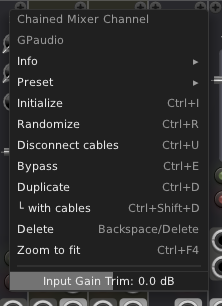
It can be used to bring very loud or quiet signals to a similar level as the other inputs for more intuitive mixing with the faders. Also, the channel faders offer the finest control around the 0 dB mark, and Input Gain Trim can be used to bring the signal into that range. Trim has a range of +/- 18dB.
Extended Channel Module
The Extended Channel module offers all the features of the Channel module plus several additional ports and controls in the right half of the front panel.
Up to 16 Channel and or Extended Channel modules can be freely combined. Any additional modules, counting from left to right, will be non-functional. Any disabled channels will not show a channel number, and all controls will be dead.
Additional Inputs and Outputs
Control Voltage
Next to the Pan/Bal knob is a CV input for Panorama or Balance. It accepts unipolar (0..10 V) and bipolar (+/- 5 V) control voltages. The value is added to the knob value. 10 Volts cover the whole range from left to right, so with unipolar CV you can turn the knob to full left and pan from left to with 0 to 10 V. With a bipolar CV, set the knob to the middle position and pan left with -5 V and right with + 5 V.
The CV input next to the fader provides a Gain CV input. The Gain input expects a unipolar 0..10 V signal. The Gain CV input controls a gain element in series with the fader. The control for the gain element is applied in a linear fashion with 0 V meaning “Off” and 10 V meaning 0 dB (unity gain). Since the element is in series with the fader, the effective gain for the 0..10 V CV range goes from “Off” to the gain value set on the fader.
Next to the Solo and Mute buttons are CV inputs for SOLO and MUTE. Any voltage above 1 V on these inputs soloes or mutes the channel. The CV control for Solo and Mute is combined with the state of the Solo and Mute buttons using a logical OR operation.
Outputs
The Extended Channel module provides a Direct Out signal. This signal is post-//Trim// (see below), Pan/Bal, Mute, Solo and the fader. If the “Main Apply Fader” parameter is set, the level of Direct Out in addition reflects the gain defined by the fader and Mute button in the Main module.
Additional Parameters
There are two PRE buttons next to the Aux send controls. If activated, the respective Aux send signals are not influenced by the channel fader or Mute button. However, the Aux send signal does get muted if another channel is in Solo mode. The PRE buttons act directly on the Aux signals without a slew rate, so changing Pre can result in audible clicks.
The MAIN APPLY FADER controls if the Direct Out signal follows the fader and Mute button of the Main module. If set, the Direct Out signal goes up and down in level together with everything else in the mixer if the main fader is moved or the main module is muted. If not set, Direct Out is only controlled by Trim, Pan/Bal, Mute, Solo and the channel fader.
The MAIN MUTE parameter allows muting the channel from the Main output signal only. If Main is muted, the channel will still feed the Aux send outputs and its own Direct Out port. This could be used, for example, to wire a signal to a rear surround speaker while still controlling it like any other channel on the mixer.
Main Module
The Main module provides the main stereo or mono output of the mixer.
There has to be exactly one Main module in an adjacent group of Chained Mixer modules. If two or more Main modules are detected, only the leftmost module of them will be active. If no Main module is present, the mixer will not work.
Outputs
The Main module provides two ports for the stereo output signal. The output signal is monophonic, any polyphonic signals coming into the Channel or Aux modules are summed into a monophonic signal before mixing takes place.
Controls
The MUTE button shuts off the output signal.
The FADER controls the audio level on the outputs. The 0dB position is marked and the gain can be adjusted up to +12 dB. The fader is not dB-linear, instead it offers the most precise gain control around the 0dB mark.
AUX1 and AUX2 are the overall gain controls for the AUX bus send outputs. Their maximum gain is 0 dB.
OVR Light
Above the fader is an OVR light. It reacts to peaks of the main audio output signal and lights up when a sample exceeds the threshold for the OVR light. The OVR light is held for a short while, so it can be noticed on very short peaks.
The threshold can be set via the module’s context menu. Right-click on the module and select a threshold from the “OVR Threshold” submenu. Possible values are:
- 10 V: This is the maximum defined voltage value in Rack, although actual voltages can be higher.
- +3 dBfs: This vaotage is 3 dB above the maximum defined bipolar audio voltage in Rack and corresponds to about 7.06 V
- 0 dBfs: The default range for audio signals in Rack is +/-5 V. This is considered 0 dBfs (dB relative to fullscale). This is the default setting for the OVR light threshold.
- -3 dBfs: A threshold 3 dB below the 5 V full scale value which is about 3.54 V.
- -6 dBfs: This value is 6 dB below +/-5 V (about 2.51 V).
Aux Module
The Aux module provides the connections for the two AUX devices as well as some controls for them. Only one Aux module can be active in an adjacent group of Chained Mixer modules. If two or more Aux modules are detected, only the leftmost module of them will be active.
Inputs and Outputs
For each of the AUX devices there is a stereo set of SEND output posts and a stereo set of RETURN input ports. It is possible to use Send and/or Return in mono, and the mixer will handle summing and panning accordingly.
The RETURN inputs will accept polyphonic cables and create an internal monophonic sum from them before they are mixed to the Main module’s output. The SEND outputs provide a monophonic signal.
Controls
Like the Channel module, the Aux module has SOLO and MUTE buttons that affect the signals from the Return inputs.
If you hold down the CTRL/CMD- and SHIFT-keys while clicking a //Mute// or //Solo// button, the other return channel will be unmuted/unsoloed.
If you hold down only the CTRL/CMD-key while clicking a //Solo// button, the other return channel also gets unsoloed, but its Solo state is remembered internally. If you click //Solo// again on the same channel with CTRL/CMD held down, that saved Solo state is restored, allowing you to toggle between soloing the two return channels.
The CTRL/CMD and SHIFT modifiers in the Aux module do not affect mute or Solo in the Channel or Extended Channel modules.
A FADER for each Aux Return signal adjusts its gain before it gets mixed into the output signal of the Main module. The 0 dB position is marked, and the maximum gain is +12 dB.