GPrackmodules
Rotary — Enhanced Rotating Speaker emulation
Rotary is a module in the GPaudio plugin for VCV Rack 2
Features
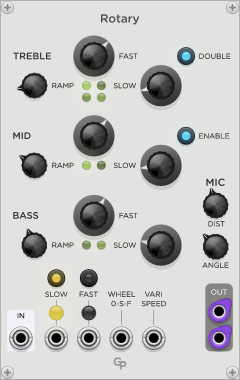
Rotary simulates the effect of a rotating speaker cabinet. Multiple speakers for different frequency bands rotate at different speeds and have different ramp times for the speakers to get up to speed. Compared to the classic hardware cabinets most often seen with tonewheel organs, Rotary offers a few enhancements to provide more complex sound options:
- In addition to the usual two-way crossover with a bass speaker and a treble horn, there is an option for a three-way crossover with an additional midrange speaker with its own rotating speed and ramp time.
- An optional second treble horn can be activated, spinning at a slightly different speed.
- In addition to the common Slow and Fast settings, Rotary also supports complete control over the rotation speed with a VariSpeed CV input.
The position of the microphones for the stereo output can be adjusted in distance and angle between the microphones.
Slow and Fast modes can be selected in three ways:
- Buttons on the Rotary front panel
- CV inputs for Slow and Fast
- With a CV input for a modulation wheel or any other CV source.
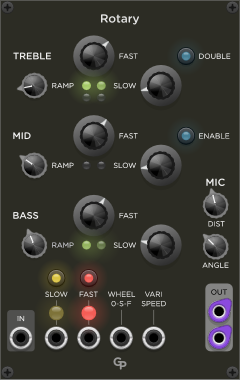
Two large lights above the CV inputs show if slow speed (yellow) or fast speed (red) is selected.
=Inputs and Outputs
- The mono input signal is fed into the IN port in the lower left corner of the front panel. The IN port will accept all signals from polyphonic cables and sum them together before they are processed.
- The processed signals are provided in the OUT section in the lower right corner. Rotary provides left and right monophonoic audio signals.
- The Slow and Fast CV inputs activate the respective rotating speeds. Both CV input states are logical ORed with the values of the respective buttons and the Wheel CV input state. Fast speed has priority over slow speed.
- The WHEEL 0-S-F CV input is meant to be used with a modulation wheel, but of course can be controlled by any CV source. It is not a linear speed control, values between 33% and 66% (of 10 Volts) select slow speed, values above 66% select fast speed.
- The VARISPEED CV input offers full control over rotating speed. Voltages between 0 V and 10 V are translated into 0 to 100 percent of the Fast RPM settings in each frequency band. If a cable is connected to the Varispeed CV input, all Slow and Fast states controlled by buttons or CV are ignored and the Slow and Fast lights disappear.
Controls
Frequency Bands
The front panel shows three frequency bands TREBLE, MID and BASS. Each band has knobs for Ramp, Slow and Fast. The Treble and Mid frequency bands have additional parameters.
RAMP knob
The RAMP parameter determines the time it takes for the speaker to reach the desired rotation speed. Braking takes about 25% longer than the given RAMP acceleration time. Only braking from Fast mode to Slow mode happens significantly faster.
SLOW and FAST knobs
The SLOW and FAST knobs control the rotation speeds of the speaker in the respective mode. The speed is controller in RPM (rotations per minute).
DOUBLE button (Treble only)
The DOUBLE button in the Treble section activates a second rotating horn in the treble section. Its Slow and Fast speeds and Ramp time are slightly different from the first horn. Therefore, the two horns go out of sync quickly, providing a more complex rich sound. Turning Double on or off can result in a little click, so the parameter should not be used for automation while audio is playing.
ENABLE button (Mid only)
The ENABLE button in the Mid section activates the three-way crossover with the midrange speaker. Classic rotating speaker cabinets only have two speakers. If Enable is off, the crossover frequency is 800 Hz. In three-way mode (Enable On) the crossover points are at 250 Hz and 2000 Hz. Turning Enable on or off can result in an audible click, so the parameter should not be used for automation while audio is playing.
Other Controls
FAST and SLOW buttons
The FAST and SLOW buttons select Slow or Fast mode. They are logical ORed with the respective CV inputs and Wheel input. If both are one, Fast mode is selected.
MIC DIST knob
The DIST knob controls the distance between the microphones and the circumfence of the rotating speaker circle. It can be adjusted in the range between 0.1 meters (about 4”) and 1 meter (about 3’4”). Please note that in the interest of the best possible latency, the distance knob does not add any additional delay to the audio signal. The audio delay always varies between 0.1 ms and about 1.15 ms.
The purpose of the MIC Dist parameter is to control the amount of gain modulation. The closer you are, the more the audio level varies as the speaker sweeps by. Since the virtual microphones for left and right are positioned at an angle, this also means that the stereo effect is more pronounced at a closer distance.
MIC ANGLE knob
The ANGLE knob defines the angle between the microphones for the left and right outputs. The angle can be varied between 90 and 180 degrees. The maximum value produces a “ping pong” stereo effect, especially at close distances. Smaller angles produce a more subtle effect.
Notes
While Rotary emulates the effect of rotating speakers pretty convincingly to the untrained ear, it is by no means a true physical simulation. Various shortcuts have been taken in the interest of keeping CPU usage at bay.
Besides, there is no emulation of the tube amplifier in the classic Leslie cabinets or of speaker characteristics. Being in a modular synthesizer, these can be added externally with other modules.
The default values of the Ramp, Slow RPM and Fast RPM settings are rough approximations of classic hardware measurements I found on the web (with some interpolation for the non-existing midrange speaker).
Rotary can also be used nicely on pad and ambient sounds. For this purpose you might consider reducing rotation speeds, especially in Fast mode. A larger mic distance can also help to make the effect more subtle.